> ## Documentation Index
> Fetch the complete documentation index at: https://docs.qa.tech/llms.txt
> Use this file to discover all available pages before exploring further.
# POC Setup Checklist
> Prepare your web application before a Proof of Concept with QA.tech
Before a Proof of Concept (POC) kickoff, verify the items below are in place. QA.tech runs the same checks during project setup and will flag anything still blocking before you start creating tests.
Native iOS and Android POCs have separate requirements — APK/simulator builds,
mobile IP ranges, and backend allowlisting. See the [Mobile POC Setup
Checklist](/getting-started/poc-mobile-setup-checklist).
***
## Before kickoff — verify these are ready
| Your team verifies | QA.tech verifies during setup |
| ---------------------------------------------------- | -------------------------------------- |
| Staging URL loads and IT has applied IP allowlisting | Environment reachable from QA.tech |
| Test accounts log in on staging | Login test passes |
| `@qatech.email` is allowed and a test email arrives | Email inbox receives mail from staging |
| Test data is scrubbed and accounts are seeded | Crawl and initial smoke tests run |
| WAF/CAPTCHA bypasses are in place (if applicable) | Tests complete without bot blocks |
***
## What to verify, and effort if not ready
Work through these in order. Network access usually takes the longest when IT is involved.
| Priority | Verify this is in order | Effort if not ready | Details |
| -------- | --------------------------------------------------------- | ------------------- | ---------------------------------------------------- |
| 🔴 **1** | QA.tech can reach staging (IPs allowlisted or SSH tunnel) | 1–5 days (IT) | [Network access](#1-network-access) |
| 🔴 **2** | Dedicated test accounts exist and log in on staging | Hours | [Authentication](#2-authentication) |
| 🟠 **3** | `@qatech.email` is allowed and test emails arrive | Hours (IT) | [Email delivery](#3-email-delivery) |
| 🟡 **4** | Staging URL is shared and test data is safe to use | Hours–days | [Environment & test data](#4-environment--test-data) |
| 🟢 **5** | WAF, CAPTCHA, and deployment protection won't block tests | Hours (IT) | [WAF & bot protection](#5-waf--bot-protection) |
***
## 1. Network access
**Biggest blocker.** If QA.tech cannot reach your staging URL, nothing else
matters. Start here — especially if your app is behind a VPN, firewall, or IP
allowlist.
QA.tech browser tests exit through a fixed pool of outbound IPs. Your CDN, WAF, or firewall must allow traffic from these addresses.
### Web testing IPs
Get the current list from [**Settings → Network**](https://app.qa.tech/current-project/settings/network) or the [Get Outbound IPs API](https://api.qa.tech/v1/outbound-ips). Copy the addresses into your CDN, WAF, firewall, or IP allowlist.
IP addresses can change. Always use the live list from Settings or the API —
never rely on a static copy.
**Forward to IT:** [Email pre-filled request to your IT team](mailto:?subject=Whitelist%20QA.tech%20IPs%20for%20staging\&body=Hi%2C%0A%0AWe%20need%20to%20whitelist%20QA.tech%27s%20outbound%20IP%20addresses%20so%20their%20automated%20testing%20can%20access%20our%20staging%20environment%20during%20our%20POC.%0A%0ACopy%20the%20current%20IP%20list%20from%3A%0Ahttps%3A%2F%2Fapp.qa.tech%2Fcurrent-project%2Fsettings%2Fnetwork%0A%0AOr%20via%20API%3A%20https%3A%2F%2Fapi.qa.tech%2Fv1%2Foutbound-ips%0A%0AAdd%20those%20addresses%20to%20our%20CDN%2FWAF%2Ffirewall%20allowlist.%0A%0AQA.tech%20traffic%20identifies%20as%20QATechBot%20in%20the%20User-Agent.%0ADocs%3A%20https%3A%2F%2Fdocs.qa.tech%2Fconfiguration%2Fip-access-control%0A%0AThanks)
Or send the request to your contact person at QA.tech, who can help coordinate with your IT team.
### Private or VPN-protected environments
If staging is not on the public internet, set up an [SSH Tunnel Proxy](/configuration/ssh-tunnel) through a bastion host and whitelist QA.tech IPs on the bastion's SSH port.
### Your team verifies
* Staging URL loads in a browser from outside your office network (or via the jump server)
* IT has applied the IP allowlist and changes have propagated (allow 5–10 minutes for CDNs)
### QA.tech verifies during setup
* Environment is reachable from QA.tech infrastructure
* A simple navigation or login test completes without 403, timeout, or CAPTCHA errors
Platform-specific guides: [IP Access](/configuration/ip-access-control) · [SSH Tunnel](/configuration/ssh-tunnel) · [Cloudflare](/configuration/cloudflare-waf-turnstile)
***
## 2. Authentication
Dedicated test accounts let the AI agent log in without manual steps. Create them in staging, then share credentials with QA.tech for Configs.
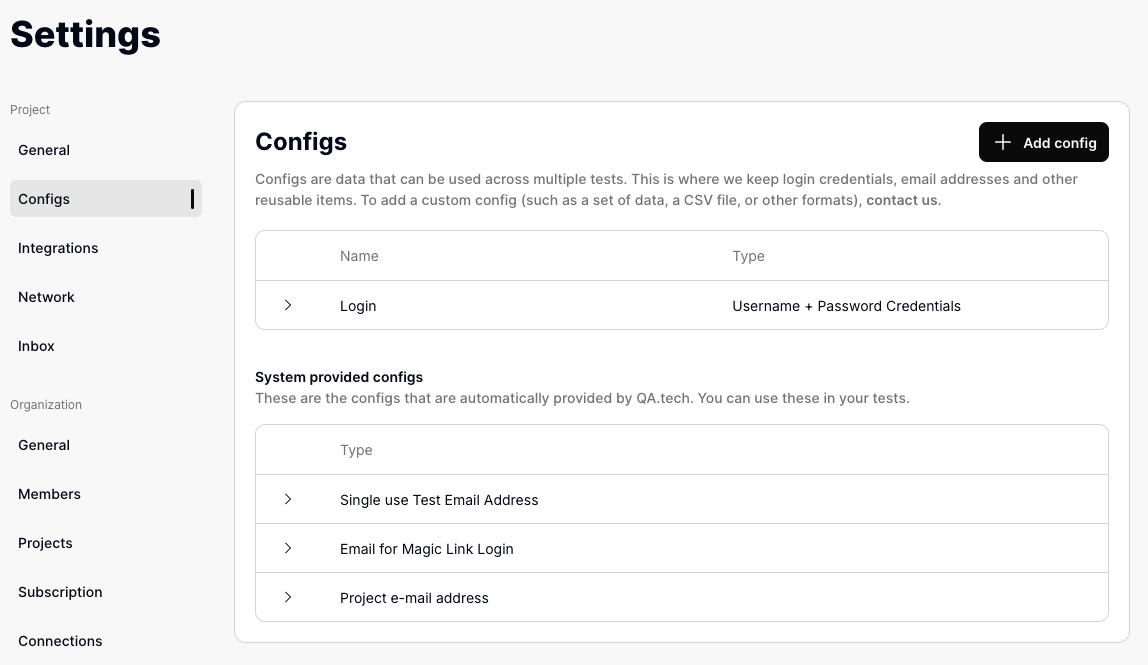 One account per role you want to demonstrate (admin, standard user, etc.).
Use credentials that exist only in non-production environments.
Log in manually with each test account before the kickoff. Fix any account,
SSO, or rate-limit issues on your side first.
QA.tech adds them to [**Settings →
Configs**](https://app.qa.tech/current-project/settings/configs) during
project setup. Or send them to your contact person at QA.tech, who will add
them for you. See [Authentication](/best-practices/handle-auth) for 2FA,
OTP, and magic-link configs.
| Method | Extra preparation |
| ------------------------ | -------------------------------------------------------------------------------------------------------------------------- |
| **OTP / magic link** | Requires [email whitelisting](#3-email-delivery) |
| **2FA (TOTP)** | Provide the `otpauth://` URI from the QR code — see [2FA setup](/best-practices/handle-auth#two-factor-authentication-2fa) |
| **CAPTCHA** | Whitelist QA.tech IPs on staging to bypass |
| **SSO / SAML** | Test IdP, bypass route, or seeded session — coordinate with identity team |
| **BankID / national ID** | Stub in staging or see [SE BankID](/applications/se-bank-id) |
Config credentials are not encrypted and are passed to AI models during tests.
Never use production credentials.
***
## 3. Email delivery
Flows like signup verification, password reset, OTP, and magic links depend on your app delivering email to QA.tech inboxes (`@qatech.email`).
One account per role you want to demonstrate (admin, standard user, etc.).
Use credentials that exist only in non-production environments.
Log in manually with each test account before the kickoff. Fix any account,
SSO, or rate-limit issues on your side first.
QA.tech adds them to [**Settings →
Configs**](https://app.qa.tech/current-project/settings/configs) during
project setup. Or send them to your contact person at QA.tech, who will add
them for you. See [Authentication](/best-practices/handle-auth) for 2FA,
OTP, and magic-link configs.
| Method | Extra preparation |
| ------------------------ | -------------------------------------------------------------------------------------------------------------------------- |
| **OTP / magic link** | Requires [email whitelisting](#3-email-delivery) |
| **2FA (TOTP)** | Provide the `otpauth://` URI from the QR code — see [2FA setup](/best-practices/handle-auth#two-factor-authentication-2fa) |
| **CAPTCHA** | Whitelist QA.tech IPs on staging to bypass |
| **SSO / SAML** | Test IdP, bypass route, or seeded session — coordinate with identity team |
| **BankID / national ID** | Stub in staging or see [SE BankID](/applications/se-bank-id) |
Config credentials are not encrypted and are passed to AI models during tests.
Never use production credentials.
***
## 3. Email delivery
Flows like signup verification, password reset, OTP, and magic links depend on your app delivering email to QA.tech inboxes (`@qatech.email`).
 ### Allow `@qatech.email`
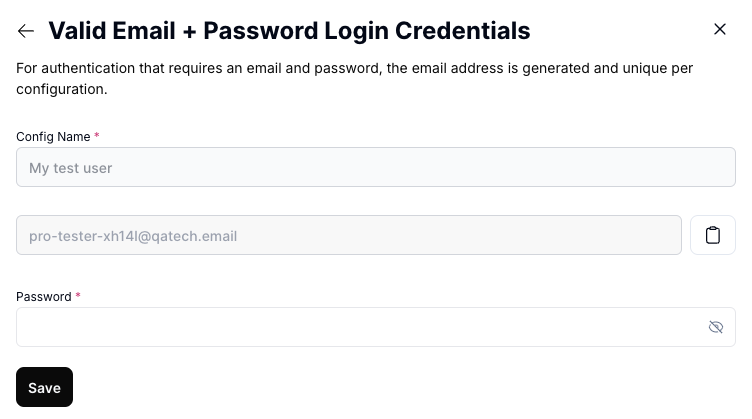
Your IT team needs to allow the entire `@qatech.email` domain in signup restrictions, email gateways, and spam filters.
**Forward to IT:** [Email pre-filled request to your IT team](mailto:?subject=Allow%20%40qatech.email%20for%20QA.tech%20testing\&body=Hi%2C%0A%0AWe%20need%20to%20allow%20the%20%40qatech.email%20domain%20for%20our%20QA.tech%20POC.%0A%0APlease%20allow%20%40qatech.email%20in%3A%0A-%20Signup%20and%20registration%20restrictions%0A-%20Email%20server%20and%20gateway%20filters%0A-%20Spam%20and%20security%20tools%0A%0ADocs%3A%20https%3A%2F%2Fdocs.qa.tech%2Ftest-features%2Femail-inbox%23whitelisting-email-addresses%0A%0AThanks)
Or send the request to your contact person at QA.tech, who can help coordinate with your IT team.
### Your team verifies
1. Create a test account using a `@qatech.email` address (or ask QA.tech for the project address)
2. Trigger a verification or magic-link email from your app
3. Confirm the email arrives within a few minutes
### QA.tech verifies during setup
* Email inbox receives mail from your staging environment
* An email-based login or verification test completes end-to-end
The agent waits up to **3 minutes** for emails during a test run. See [Email Inbox](/test-features/email-inbox).
***
## 4. Environment & test data
### Environment
Provide a **staging or QA URL** — not production. QA.tech adds it under [**Settings → Applications & Envs**](https://app.qa.tech/current-project/settings/applications). See [Applications and Environments](/core-concepts/applications-and-environments).
If your POC spans multiple apps (customer frontend + admin panel), share each URL separately.
### Test data
The environment must contain **scrubbed, non-sensitive data**:
* No real customer PII (names, emails, addresses, payment details)
* No GDPR-regulated personal data unless anonymized through a documented process
* Repeatable state — accounts and sample records for the journeys you want to demo
| Strategy | Best for |
| ------------------------ | -------------------------------------------- |
| Scrubbed production copy | Realistic data; needs anonymization pipeline |
| Static staging database | Simple POC; data persists |
| Seed scripts with reset | Isolated, repeatable runs |
Seed login accounts, sample records, feature flags, and sandbox modes for third-party integrations (payments, SMS) before kickoff.
***
## 5. WAF & bot protection
If staging sits behind deployment protection or bot detection, configure bypasses before the POC.
| Protection | Guide |
| ---------------------------- | --------------------------------------------------------------------- |
| Cloudflare WAF / Turnstile | [Cloudflare WAF & Turnstile](/configuration/cloudflare-waf-turnstile) |
| Vercel deployment protection | [Vercel Preview](/configuration/vercel-preview-protection) |
| Vercel Firewall | [Vercel Firewall](/configuration/vercel-firewall) |
### Allow `@qatech.email`
Your IT team needs to allow the entire `@qatech.email` domain in signup restrictions, email gateways, and spam filters.
**Forward to IT:** [Email pre-filled request to your IT team](mailto:?subject=Allow%20%40qatech.email%20for%20QA.tech%20testing\&body=Hi%2C%0A%0AWe%20need%20to%20allow%20the%20%40qatech.email%20domain%20for%20our%20QA.tech%20POC.%0A%0APlease%20allow%20%40qatech.email%20in%3A%0A-%20Signup%20and%20registration%20restrictions%0A-%20Email%20server%20and%20gateway%20filters%0A-%20Spam%20and%20security%20tools%0A%0ADocs%3A%20https%3A%2F%2Fdocs.qa.tech%2Ftest-features%2Femail-inbox%23whitelisting-email-addresses%0A%0AThanks)
Or send the request to your contact person at QA.tech, who can help coordinate with your IT team.
### Your team verifies
1. Create a test account using a `@qatech.email` address (or ask QA.tech for the project address)
2. Trigger a verification or magic-link email from your app
3. Confirm the email arrives within a few minutes
### QA.tech verifies during setup
* Email inbox receives mail from your staging environment
* An email-based login or verification test completes end-to-end
The agent waits up to **3 minutes** for emails during a test run. See [Email Inbox](/test-features/email-inbox).
***
## 4. Environment & test data
### Environment
Provide a **staging or QA URL** — not production. QA.tech adds it under [**Settings → Applications & Envs**](https://app.qa.tech/current-project/settings/applications). See [Applications and Environments](/core-concepts/applications-and-environments).
If your POC spans multiple apps (customer frontend + admin panel), share each URL separately.
### Test data
The environment must contain **scrubbed, non-sensitive data**:
* No real customer PII (names, emails, addresses, payment details)
* No GDPR-regulated personal data unless anonymized through a documented process
* Repeatable state — accounts and sample records for the journeys you want to demo
| Strategy | Best for |
| ------------------------ | -------------------------------------------- |
| Scrubbed production copy | Realistic data; needs anonymization pipeline |
| Static staging database | Simple POC; data persists |
| Seed scripts with reset | Isolated, repeatable runs |
Seed login accounts, sample records, feature flags, and sandbox modes for third-party integrations (payments, SMS) before kickoff.
***
## 5. WAF & bot protection
If staging sits behind deployment protection or bot detection, configure bypasses before the POC.
| Protection | Guide |
| ---------------------------- | --------------------------------------------------------------------- |
| Cloudflare WAF / Turnstile | [Cloudflare WAF & Turnstile](/configuration/cloudflare-waf-turnstile) |
| Vercel deployment protection | [Vercel Preview](/configuration/vercel-preview-protection) |
| Vercel Firewall | [Vercel Firewall](/configuration/vercel-firewall) |
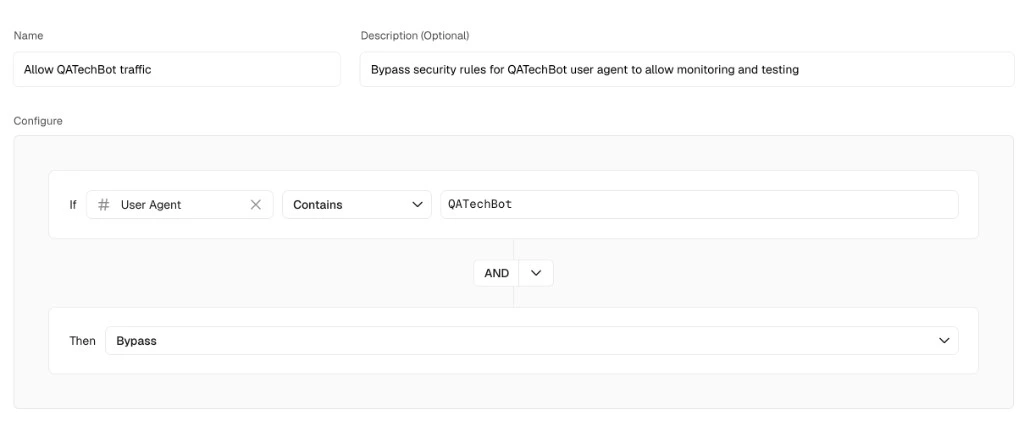 For HTTP Basic Auth popups on staging, enable **Use for Basic Auth** on a Username + Password [Config](/core-concepts/configs).
***
## Getting help
Contact [QA.tech Support](https://qa.tech/contact) or your QA.tech contact with your staging URL, how it is protected, which auth methods you use, and any error messages from failed tests.
For HTTP Basic Auth popups on staging, enable **Use for Basic Auth** on a Username + Password [Config](/core-concepts/configs).
***
## Getting help
Contact [QA.tech Support](https://qa.tech/contact) or your QA.tech contact with your staging URL, how it is protected, which auth methods you use, and any error messages from failed tests.