

User-Agent header—you can add a firewall rule to bypass security checks for that traffic.
This is separate from Vercel Preview
Protection (password protection,
Vercel Authentication, deployment protection). Use this page for Firewall /
WAF rules; use the preview guide for protected preview URLs.
Allow QATechBot with a custom rule
Create a custom firewall rule in your Vercel project that bypasses remaining rules when the User-Agent containsQATechBot:
1
Open Firewall settings
In the Vercel dashboard, open your project → Firewall (or Security → Firewall).
2
Add a custom rule
Create a new custom rule with these settings:
3
Publish the rule
Save and publish the rule. Vercel applies firewall changes globally within seconds—no redeploy required.
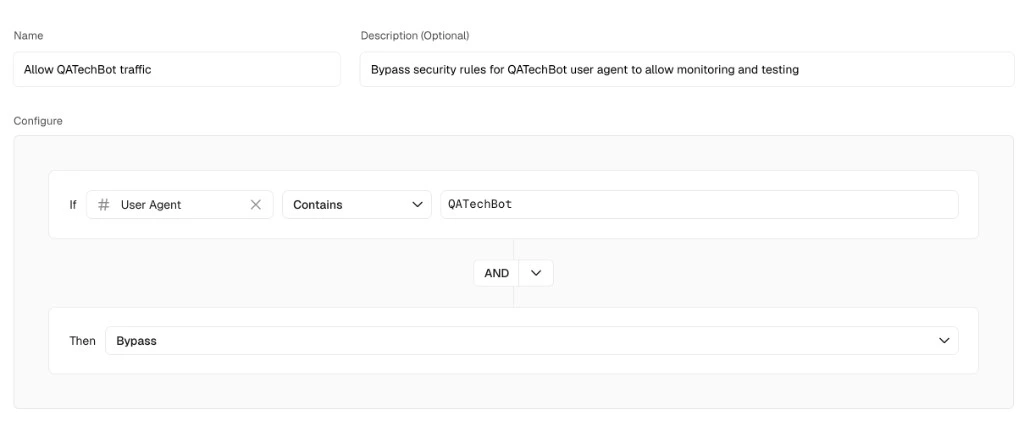
User-Agent reference
QA.tech appends this suffix to browser automation traffic:QATechBot (substring), which covers the full automation User-Agent.
CLI example
You can also add the rule with the Vercel CLI:Related documentation
Vercel Preview Protection
Bypass deployment protection on preview URLs
QA.tech Bot
User-Agent format and traffic verification
IP Access
Allowlist QA.tech egress IPs
Cloudflare WAF & Turnstile
Edge blocking and Turnstile on Cloudflare